Over 50 million people use Cash App every month, but here’s something most don’t know. About 68% of users pay unnecessary fees for instant transfers when they could get their money for free. If you’re paying 1.75% every time you move money to your bank, that adds up fast.
Moving money from Cash App to your bank account is actually simple. You have two choices: a free transfer that takes a few days, or a paid instant transfer that arrives in minutes. Most people pick instant without thinking about it, then wonder why their balance keeps shrinking.
This guide shows you exactly how both methods work. You’ll learn when to use each option, how to avoid common mistakes, and how to keep more money in your pocket. Whether you need cash right now or can wait a couple days, you’ll know the smartest way to get your money where it needs to go.
What You Need Before Starting
You can’t transfer money from Cash App without a few things set up first. Make sure you have an active Cash App account with money in it. Sounds obvious, but people try to transfer empty accounts more often than you’d think.
Your bank account or debit card needs to be linked to Cash App. Without this connection, the app has nowhere to send your money. You also need a stable internet connection and the latest version of Cash App installed on your phone. Outdated apps cause most transfer problems people face.
Check your Cash App balance before you start. The app won’t let you transfer more than you have, but knowing your exact balance helps you avoid failed transfers.
The Two Ways to Transfer Money from Cash App to Your Bank
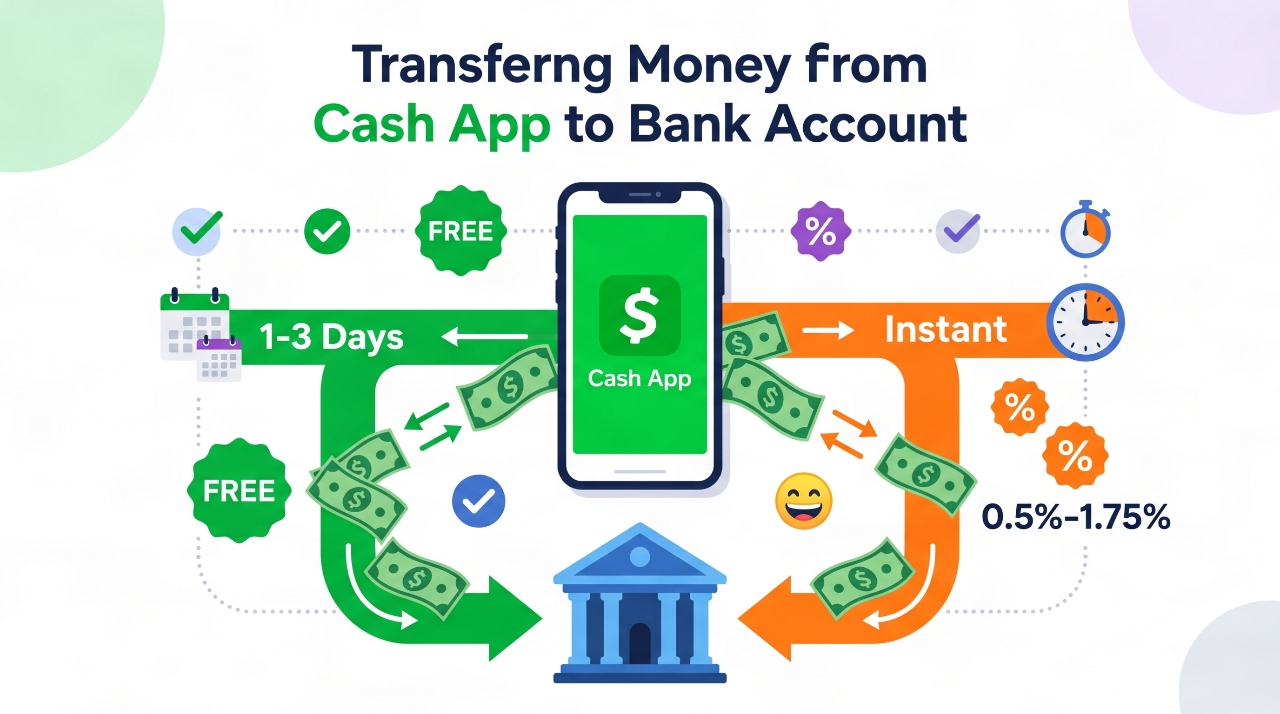
Cash App gives you two transfer options, and picking the wrong one costs you money. Standard transfers are completely free but take one to three business days. Instant transfers cost a fee but put money in your account within minutes.
The difference comes down to speed versus savings. Standard transfers use the ACH system that banks use to move money between accounts. This system is free but slow because it processes transfers in batches. Instant transfers go directly to your debit card using a faster network that charges for the convenience.
Most people should use standard transfers for regular money management. Save instant transfers for emergencies when you really need cash fast. A small amount of planning lets you avoid fees almost completely.
| Transfer Type | Cost | Speed | Best For |
|---|---|---|---|
| Standard | Free | 1-3 business days | Regular transfers, large amounts |
| Instant | 0.5% to 1.75% | Under 30 minutes | Emergencies, urgent needs |
Standard Transfer: The Free Option
Standard transfers cost nothing, which makes them perfect for moving money you don’t need immediately. The process takes one to three business days because Cash App uses the ACH network that connects all U.S. banks. This network processes transfers in groups rather than individually, which keeps costs down.
Your money leaves Cash App quickly, but your bank needs time to process and post it. Business days mean Monday through Friday, not counting bank holidays. A transfer started Friday afternoon won’t begin processing until Monday.
Step by Step Instructions for Standard Transfer
Open Cash App on your phone and look at the bottom of the screen. You’ll see your current balance displayed there. Tap on that balance number to open your transfer options.
Select the “Cash Out” button that appears. Enter the amount you want to transfer to your bank. You can transfer your entire balance or just part of it. Choose the “Standard” option when the app asks about transfer speed.
Pick which bank account should receive the money if you have multiple accounts linked. Tap confirm to complete the transfer. Cash App will show you a confirmation message with the expected arrival date. Screenshot this confirmation in case you need it later.
When to Use Standard Transfers
Free transfers make sense for planned expenses and regular money management. If you’re moving money to pay rent next week, standard transfer gets the job done without fees. The same goes for building savings or paying bills that aren’t due immediately.
Large amounts benefit most from free transfers. Moving $1,000 with instant transfer costs $17.50 at the highest fee rate. That same transfer costs zero dollars with standard delivery. Three extra days of waiting saves real money.
Use standard transfers as your default choice. Only switch to instant when you have a genuine time crunch.
Instant Transfer: When You Need Money Fast
Instant transfers solve problems that can’t wait three days. Your money typically arrives in under 30 minutes, though Cash App allows up to 30 minutes for processing. The speed costs between 0.5% and 1.75% of your transfer amount, with a minimum fee of $0.25.
The exact fee depends on your account and transfer details. Cash App shows you the fee before you confirm, so you always know what you’re paying. This transfer type requires a linked debit card, not just a bank account. The money goes directly to your card instead of through the slower bank network.
Visit Cash App’s official fee schedule for the most current pricing information and updates.
Step by Step Instructions for Instant Transfer
Start the same way as a standard transfer by tapping your balance at the bottom of Cash App. Choose “Cash Out” and enter your transfer amount. This time, select the “Instant” option when asked about speed.
Pick your linked debit card from the list of options. Cash App displays the fee for this transfer right on the screen. Review the amount you’ll receive after fees, then confirm the transfer if you accept the cost.
Your phone should show a confirmation within seconds. Check your bank account or card balance after a few minutes. Most instant transfers complete in under ten minutes, though some take longer.
When to Use Instant Transfers
Emergency expenses justify instant transfer fees. A car breakdown, urgent medical bill, or other crisis makes the fee worthwhile. You can’t always wait three days when real problems happen.
Time sensitive payments also make sense for instant transfers. If you need to pay someone today or miss an opportunity, the fee becomes a reasonable cost. Weekend or holiday transfers work better as instant since standard transfers don’t process on those days.
Small amounts keep fees manageable. Transferring $20 costs only $0.25 to $0.35 in fees. That’s less than an ATM charge at many banks. Larger amounts should use standard transfer unless you really need speed.
How to Link Your Bank Account to Cash App
Linking your bank account to Cash App only takes a few minutes but enables all transfers. The app needs this connection to know where to send your money. Cash App uses bank level encryption to protect your information during this process.
You need your bank’s routing number and your account number. These numbers appear on your checks and in your online banking app. Some people also need their online banking username and password if they link through automatic verification.
Steps to Link Bank Account
Tap the profile icon in the top corner of Cash App. This icon looks like a person or shows your profile picture. Scroll down and select “Linked Banks” from the menu.
Tap the “Link Bank” button to start the connection process. Cash App shows you a list of popular banks. Pick yours from the list if you see it, or choose “Other” to enter information manually.
Enter your online banking login if using automatic linking, or type in your routing and account numbers for manual linking. Cash App may send small test deposits to verify the account. Check your bank for these deposits and confirm the amounts in Cash App.
The verification process takes one to two business days for test deposits. Once verified, your bank account is ready for transfers.
Finding Your Bank Account Information
Your routing number identifies your bank and appears on the bottom left of paper checks. The account number sits next to it and identifies your specific account. Online banking apps show both numbers in account details or settings.
Checking accounts work better for transfers than savings accounts. Federal law limits savings account transactions to six per month. Your bank might convert savings to checking or charge fees if you exceed this limit.
Call your bank if you can’t find these numbers. Customer service can provide them over the phone after verifying your identity.
How to Link a Debit Card Instead
Debit cards enable instant transfers and work as a backup for standard transfers. Most major debit cards work with Cash App, including Visa, Mastercard, Discover, and American Express. The card must be connected to a U.S. bank account.
Prepaid cards and credit cards don’t work for transfers out of Cash App. You can use credit cards to add money to Cash App, but not to receive money from it. Some prepaid cards work for receiving money, but most don’t qualify.
Steps to Link Debit Card
Open your Cash App profile by tapping the icon in the corner. Select “Linked Banks” even though you’re adding a card. The option to “Link Debit Card” appears on this screen.
Enter your card number, expiration date, and CVV code from the back of the card. Add your billing address exactly as it appears on your card statement. Any mismatch might cause verification to fail.
Cash App verifies the card instantly in most cases. You can start using it for instant transfers right away. Keep the card active and in good standing for transfers to keep working.
Transfer Limits You Should Know About
Cash App limits how much you can transfer based on your account type. Unverified accounts can only transfer a few hundred dollars per week. Verified accounts get much higher limits that work for most people.
Standard accounts without identity verification can transfer $250 per week. That’s all transfers combined, not per transfer. Verified accounts can transfer $7,500 per week through standard transfers and $1,000 per instant transfer.
These limits reset weekly, not monthly. The week starts on Monday and ends on Sunday for Cash App’s counting system. Hitting your limit means waiting until the next Monday to transfer more.
You can increase limits by verifying your identity in the app. Cash App asks for your full name, date of birth, and the last four digits of your Social Security number. This information helps prevent fraud and unlocks higher limits.
How Much Do Transfers Really Cost?
Standard transfers always cost zero dollars no matter how much you move. Transfer $10 or $10,000 and the fee stays at $0. This makes standard the smart choice for anyone who can wait a few days.
Instant transfer fees range from 0.5% to 1.75% of your transfer amount. The percentage varies based on factors Cash App doesn’t fully explain. Most users see fees around 1.5% for typical transfers.
Here’s what you actually pay for different amounts:
- $20 instant transfer: $0.25 fee (minimum charge)
- $100 instant transfer: $1.50 to $1.75 fee
- $500 instant transfer: $7.50 to $8.75 fee
- $1,000 instant transfer: $15 to $17.50 fee
Calculate whether instant makes sense by comparing the fee to your need. Paying $1.50 to access $100 today might beat a $35 overdraft fee. Paying $17.50 just for convenience when you don’t have an emergency wastes money.
Users who transfer weekly could spend $75 to $100 monthly on instant transfer fees. That same money transferred free through standard delivery costs nothing.
How Long Does Each Transfer Type Take?
Standard transfers take one to three business days from start to finish. Business days count Monday through Friday, excluding federal holidays. A transfer started on Wednesday should arrive by Friday, but might take until Monday.
Your bank controls the final step of posting money to your account. Some banks post transfers early in the morning, others wait until evening. This timing varies by bank and sometimes by day of the week.
Instant transfers typically complete in under 30 minutes. Many finish within five to ten minutes. Cash App allows up to 30 minutes before considering the transfer delayed. Very few instant transfers actually take the full 30 minutes.
Network issues, bank maintenance, or verification problems can slow any transfer. Starting transfers during business hours on weekdays reduces delay chances. Late night and weekend transfers sometimes process slower even for instant delivery.
The best time to start a standard transfer is Monday or Tuesday morning. This gives the full week for processing and avoids weekend delays. Instant transfers work any time but cost the same regardless of when you send them.
Common Problems and How to Fix Them
Transfer Failed or Declined
Insufficient balance causes most failed transfers. Cash App won’t let you transfer more money than your account holds. Double check your balance before entering a transfer amount.
Bank account problems also stop transfers from going through. A closed account, frozen account, or account with restrictions can’t receive money. Log into your bank to verify the account is active and working normally.
Outdated app versions create random transfer failures. Update Cash App through your phone’s app store to fix these issues. Restart your phone after updating for best results.
Poor internet connection during transfer confirmation causes failures too. Wait for a strong WiFi or cellular signal before trying again. The transfer won’t process until Cash App can connect to its servers.
Money Not Showing Up in Bank
Check your transfer status in Cash App first. Tap the clock icon to see activity and find your transfer. The status shows whether the money left Cash App or is still processing.
Standard transfers need the full one to three business days. Money might leave Cash App on day one but not appear in your bank until day three. This waiting period is normal, not a problem.
Your bank might process deposits at specific times each day. Some banks only update balances once per day, usually in the evening. Check again after your bank’s processing time.
Contact Cash App support if money doesn’t arrive after three full business days for standard transfers or one hour for instant transfers. Use the app’s support feature to report the problem with your transaction details ready.
Can’t Find My Bank Account
Not every bank appears in Cash App’s automatic linking list. Choose the manual entry option to add any U.S. bank. You’ll need your routing and account numbers for manual linking.
Verify you’re entering the correct routing number for your specific branch. Some large banks use different routing numbers for different states. Your checks or online banking show the right number.
Try linking through your bank’s online login instead of manual entry. This automatic method works when manual entry fails. Some banks support one method better than the other.
Credit unions and smaller banks sometimes take longer to verify. Be patient with the test deposit process and check your bank daily for the small amounts.
Instant Transfer Not Available
Instant transfers require a linked debit card, not just a bank account. Add a debit card if you only linked your bank account number. The option appears in the same menu as bank linking.
Only certain card types qualify for instant transfers. Prepaid cards, credit cards, and some business debit cards don’t work. Regular personal debit cards from major networks work best.
Unverified Cash App accounts can’t use instant transfer in some cases. Complete identity verification to unlock this feature. The verification process takes a few minutes in the app.
Your location might limit instant transfers. Cash App works differently in some states due to local regulations. Contact support if you can’t access instant transfer with a verified account and linked debit card.
Security Tips for Safe Transfers
Enable every security feature Cash App offers. Set up a PIN code, Face ID, or Touch ID to lock your app. These features stop someone from transferring your money if they get your phone.
Double check bank account information before confirming any link. One wrong number sends your money to the wrong place. Transfers to incorrect accounts are nearly impossible to reverse.
Watch for phishing scams that pretend to be Cash App. The company never asks for your password or PIN through email or text. Always open the official app directly instead of clicking links in messages.
Keep Cash App updated to get the latest security patches. Old versions have vulnerabilities that hackers can exploit. Turn on automatic updates so you don’t forget.
Never share your login details with anyone, even people claiming to be Cash App support. Real support never needs your password to help you. They can access your account information on their end.
Check transfer confirmations every time. Make sure the amount and destination match what you intended. Screenshot confirmations for your records.
Monitor your bank account after transfers complete. Verify the right amount arrived at the right time. Report anything suspicious immediately to both Cash App and your bank.
Can You Cancel or Reverse a Transfer?
Standard transfers can sometimes be cancelled if you act fast. You have a short window after confirming the transfer before Cash App sends it to your bank. Open the activity tab and look for a cancel option on the pending transfer.
This cancellation window only lasts a few minutes to maybe an hour. Once Cash App submits the transfer to the banking network, cancellation becomes impossible. The money is already moving between systems.
Instant transfers can’t be cancelled at all. The money leaves Cash App and hits your debit card within minutes. There’s no time to stop the process even if you change your mind immediately.
After a transfer completes, reversing it requires transferring money back from your bank to Cash App. The original transfer itself stays permanent. This applies to both standard and instant transfers.
Contact Cash App support immediately if you transferred to the wrong account. They might be able to help, but don’t count on it. Banking regulations make reversing completed transfers very difficult.
Your bank can’t reverse transfers coming from Cash App. They receive the money as a normal deposit. Only Cash App can initiate any kind of reversal, and they rarely do this.
Alternative Ways to Get Money Out of Cash App
The Cash App Cash Card works at ATMs nationwide. Order this free debit card through the app and use it to withdraw cash. ATM fees apply based on which machine you use, but the card itself is free.
Spend your Cash App balance directly using the Cash Card. This Visa debit card works anywhere Visa is accepted. You don’t need to transfer money to your bank if you can spend from Cash App instead.
Send money to trusted friends or family who can give you cash. They receive the transfer in their Cash App instantly and for free. This works when you need cash but want to avoid instant transfer fees.
Keep some balance in Cash App for online purchases and bills. Many companies accept Cash App for payment. Money already in the app doesn’t need transferring.
Each method has trade offs. ATM withdrawals cost fees at most machines. Direct spending only works where cards are accepted. Sending to friends requires trusting them. Keeping balances in Cash App means money isn’t in your bank earning interest.
Tips to Save Money on Transfer Fees
Plan ahead to use standard transfers instead of instant. Move money to your bank before you need it there. A little planning saves hundreds of dollars yearly in fees.
Transfer larger amounts less often rather than small amounts frequently. One $500 transfer beats five $100 transfers. The same money moves with fewer chances to pay fees.
Calculate the fee percentage before choosing instant transfer. Sometimes the math shows the fee isn’t worth it. Other times you’ll see the fee is reasonable for your situation.
Set up automatic standard transfers weekly. Decide on a day each week to move your Cash App balance to your bank. This routine prevents balance buildup and emergency transfer needs.
Time transfers for early in the week. Monday and Tuesday transfers have the full week to process. This reduces the chance you’ll need expensive instant transfer later.
Keep emergency money in your bank account instead of Cash App. Your bank balance should cover urgent expenses. Use Cash App for receiving money and making payments, not as your main account.
How This Compares to Other Payment Apps
Venmo offers similar transfer options with free standard and paid instant transfers. Their fee structure matches Cash App almost exactly. The main difference is Venmo requires you to transfer to a bank account first, then optionally to a card.
PayPal charges no fee for standard transfers but takes three to five business days instead of one to three. Instant transfers cost 1.5% with a $0.25 minimum and $15 maximum. This maximum cap helps with large transfers.
Zelle transfers are instant and free but work differently. Money goes directly between bank accounts without sitting in an app first. You need a bank that supports Zelle to use this option.
Apple Cash transfers free to your bank in one to three business days. Instant transfers cost 1.5% with a $0.25 minimum and $10 maximum. The lower maximum fee beats Cash App for transfers over $571.
Cash App’s system competes well with these alternatives. The free standard option matches everyone else. Instant fees fall in the typical range. The choice between apps depends more on which your friends use than transfer costs.
Frequently Asked Questions
Is transferring money from Cash App to bank safe?
Yes, Cash App uses encryption and security measures that meet banking standards. Billions of dollars transfer through the app safely every year. Enable all security features and verify account information to maximize safety.
How many times can I transfer in a day?
You can make multiple transfers per day up to your weekly limit. Unverified accounts hit limits faster with their $250 weekly cap. Verified accounts can transfer $7,500 weekly through as many individual transfers as needed.
Can I transfer to someone else’s bank account?
No, you can only transfer to bank accounts and debit cards linked to your own Cash App account. Send money to other people through Cash App’s send feature instead. They can then transfer it to their own bank.
What if I entered wrong bank information?
Contact Cash App support immediately. Money sent to wrong account information might bounce back, but this takes time. Prevention works better than fixing this problem, so always double check numbers before confirming.
Do I need to pay taxes on transferred money?
Transfers themselves aren’t taxable. You pay taxes on income, not on moving money between accounts. Cash App reports certain transaction totals to the IRS, but transferring to your bank doesn’t create a tax event.
Can I transfer on weekends?
You can start transfers any day, but standard transfers only process on business days. A Saturday transfer won’t begin processing until Monday. Instant transfers work seven days a week at the same cost.
Why is my transfer pending?
Standard transfers show as pending for one to three business days normally. Verification issues, bank holidays, or account problems can extend this time. Check transfer status in your activity feed for specific information.
What’s the maximum I can transfer?
Verified accounts can transfer $7,500 per week through standard transfer and $1,000 per instant transfer. Unverified accounts max out at $250 weekly total. These limits reset every Monday.
Conclusion
Moving money from Cash App to your bank takes just a few taps once you understand the process. Standard transfers give you free service in one to three business days. Instant transfers cost fees but deliver money in minutes when emergencies happen.
Most people should rely on standard transfers for everyday money management. The free option works perfectly fine when you plan ahead even a little bit. Save instant transfers for those rare times when waiting isn’t possible.
The process itself is simple enough that anyone can do it. Link your bank account or debit card once, then transfers become routine. A few minutes of setup saves you money and stress for years.
Start by linking your bank account in Cash App today. Try a small standard transfer to see how the process works. Set a weekly reminder to move your balance so money doesn’t pile up in the app.
This small habit keeps your main funds in your bank where they belong. Cash App works great for receiving and sending money, but your bank account should hold your primary balance. Master these transfers and you’ll use Cash App more effectively while keeping more money in your pocket.